Thursday, 4 June 2009

Film Club


It is clear from the interest in our Film Competition, that many of you are interested in using and working with film with your children. The Film Club looks like a great free resource to help you explore this area further in an after school or Lunch Time club.


FILMCLUB is a network of after-school film clubs. It gives young people the chance to journey through the limitless universe of film. With weekly screenings and activities, FILMCLUB is fast becoming the most popular school activity in the country.


Here is some further information about the project from NATE, its organisers:


FILM CLUB is one of the most exciting initiatives I’ve come across in years. Love film? Love FILM CLUB!
Ian McNeilly, Director, NATE

Designed to inspire, entertain, and arouse creative and curious minds, FILMCLUB provides your school with a choice of thousands of films, your licence for screening, promotional materials, and free training for teachers. We have an interactive website onto which your students can upload their own movie reviews and we also run an exciting range of events, competitions and a film industry interaction programme where we arrange for special guests to visit FILMCLUB member schools. FILM CLUB is funded by the DCSF so all of our services are completely FREE to all state funded primary and secondary schools!

“FILMCLUB is a fantastic resource for our School Club. The children love being able to choose films for their own ‘Club Cinema’. It has been a real pleasure seeing children share their enjoyment and appreciation of different films. Characters have been discussed, amusing scenes recounted, it has been astonishing the amount of positive social interaction that FILMCLUB has inspired.”


(Nichola Douglass, FILMCLUB Leader, East Borough Primary School)


For more info - visit the web site: http://www.filmclub.org/

Tuesday, 2 June 2009

Free £10 - Just for having a Visualiser Demo


Here is a free gift from AVER Media for Redbridge schools and the chance to get a through demonstration of a visualiser, which I know many people maybe thinking about buying.

Aver Media have run pilot projects with Visualisers in our neighbouring borough of Havering, as shown in the film below:


Adrian Kite from AverMedia, says:

A Visualiser from AVerMedia is just what you need to enthuse your students, making learning fun, spontaneous and engaging. Our dedicated sales team would be delighted to show you how
a Visualiser can help you to deliver an even better classroom experience for your pupils and make your job easier!
  • A visualiser can connect to virtually any projector or whiteboard
  • Provides a striking visual element to your lessons!
  • Can be used to support all National Curriculum subjects
  • Capture, annotate and save pupils work - ideal for supporting Assessment for Learning objectives

To book your FREE demonstration, please contact us by email - simon.k@avermedia.com or telephone 01908 371 772
Alternatively complete
the form here and fax back to
01908 644 259
You will be sent the vouchers of your choice following the demonstration.
Please note that no cash or alternatives will be offered in lieu of vouchers

Monday, 1 June 2009

Assessment Course, Fronter News


Welcome Back

I love these videos from Microsoft, which you must have seen recently during the ad breaks of programmes like 'Britains Got Talent'. They are part of the company's 'I am a PC' campaign.


What strikes me about this particular clip is that the child is not using Movie Maker as part of her end of SATS project in Year 6, no she is in Year 3, and probably could have done something similar when she was in Year2!


Food for thought eh...

Anyway, we took a small break for SATS week and the half term holiday, but now we are back with some key bits of news and links.

In this Issue:


  • That enlarging thing on the Whiteboard that Alex does


  • Assessment Course

  • ESafety Clicker Grids


  • Fronter Adaptions for SEN

  • Just In


'That enlarging thing on the Whiteboard that Alex does'


Many of you will have attended courses or training with either myself or Alex, where we have managed to greatly zoom in on a detail on screen. In case you missed this tool, it is called Zoomit and can either be installed or run directly from the website in the background. Its Microsoft, so it is safe to use and avoids some of the more fiddly zooming tools you often get with whiteboard software.

Zoom it can be found by clicking on this link.


Assessment Course Wednesday 10th June


Next week we are running or assessment course on Primary ICT. We are very excited by this, as this year we welcome along Julian Nietrzebka as our course tutor.

If you read the biog below,it is clear that we have the National expert on assessment in Primary ICT, therefore this will be a very comprehensive and authoritative day.


Who is Julian Nietrzebka?


Julian has extensive experience of leading the strategic development of ICT. He is passionate about the power of ICT to enable learning and inclusion and currently leads LearnSW, an independent educational consultancy. Previous posts include PNS Senior Regional Adviser for the South West including responsibility for ICT, Primary Link Adviser ICT with Torbay LA, and Senior Curriculum Adviser ICT, Northamptonshire LA. He was one of four consultants working with QCA to develop APP ICT at KS3. He has written and contributed to a number of ICT national resources including a Primary Framework for ICT, Hands on Support Guidance, Learning and Teaching with ICT in the Primary Phase, Curriculum section of the SRF, Strategic Leadership of ICT for SIPs, and Assessing ICT Capability Primary. He is an accredited primary SIP and ICT Mark Assessor. Before becoming a cross phase advisory teacher in 1988 Julian was a Head of Art and Design.

Here is the draft agenda:


  • Implications arising for educators from the current educational and global context


  • Effective Assessment for Learning and the use of modern technologies


  • Assessing Pupils Progress in ICT รข€“ principles and practice


  • Agreeing standards in ICT and strategies

  • Resources and next steps

If you are interested in coming, or sending a teacher/ICT Coordinator, then there are a few places available, though please be aware that delegates need to bring 3 or more pieces of ICT work from a range of contexts from lessons that they have taught..

Note if you are from outside Redbridge and want to attend, we may be able to accommodatete you, but at a charge. email me ASAP


Animation Day

Before half term we had another successful and inspiring animation day at the Teachers Centre. Delegates explored the use of claymation, stop-motion and 2d applications. One of the sessions looked at using 2Animate in quite a simple way to demonstrate Scientific processes. I'd like to say this was my idea, but it came from Katie from 2Simple during a Twitter discussion the day before the course. Using 2Animate in this way is incredibly quick and can be achieved with just a few frames, as opposed to the long and tedious click, position, click process that we use for clay animation type flicks.

Here are a small selection of examples made by teachers during the day:


ESafety Clicker Grids

Thank you to Sandra @ Crick who has alerted me to the Clicker Grids they have created to accompany the new Know it All for Primary resource from Childnet.

She writes:


Just a short e-mail to give you some up to date information on a project we have been involved in with Childnet International, and the new UK Council for Child Internet Safety.The project, Know IT All for Primary Schools, contains a 3D animation called 'The Adventures of Kara, Winston and the SMART Crew'. To support and reinforce the e-safety messages contained within this resource, Crick Software has created related Clicker activities.

These are currently featured Clicker 5 resources within Learning Grids.The animation covers Childnet's 5 SMART rules, which have been proven to be effective in helping younger children understand the importance of keeping safe online. Through their travels Kara and Winston use the internet, mobile phones, social networking pages and chat to negotiate and find their way through the adventure. On their journey they are able to interact with a real life SMART crew who give advice to help Kara and Winston stay safe.
Clicker presents a simplified version of the story in an on-screen talking book format, offering the opportunity for reinforcement of the key messages contained within the five rules and is designed so that teachers can follow-up the story and the very important messages contained within it."Internet safety is vital for all children and we are thrilled that Crick Software has joined us in supporting this resource.

As Clicker is used in over 90% of primary schools, and with over 70,000 registered users of their LearningGrids World site, Crick's support has meant that this resource is readily accessible to teachers working with children at all levels in a primary school setting." said Will Gardner, CEO at Childnet International.

Note from Anthony:

The SMART rules are also available on the KIA site in Widget Symbol format, what a great idea!!

Click here for these, if you download these and put them in your ICT suite, or near a computer let me know!!

Fronter Adaptions for SEN

Fronter have produced a handy guide for using the London MLE with pupils with Special Educational needs. Many of the thinsg in this guide are useful for children with SEN, regardless of the MLE, it is worth downloading from here.


Just In:

Some of you have called about courses in 2009/2010 - contrary to what you may experience of Redbridgepdc these courses are not fully booked, it is just that they are not open for bookings yet. We are waiting to ensure all the dates are confirmed. Details soon!

Scribble Maps - it was previously very difficult to embed a google map into Fronter- Scribblemaps allows you to create your own annotated maps using Google maps, these can be embedded as a Flash file in Fronter or Digital Brain.


BBC Earth has launched its own ">Youtube Channel, there are some excellent clips in here that would greatly enhance Geography, Science or Literacy.


Sugarstacks.com - want to show how much sugar there really is inside food and fizzy drinks, let this site show you. Though many of the products are American, there are still many that your children will be familar with gorging on. Check out the Nesquick picture- eerregh. Maybe your class could make their own pictures!!

And...

Those nice people over @ Brainpop UK have put together a little video that explains Swine Flu , follow the link here


Saturday, 30 May 2009

Google Competition


Are you looking for a great cross- curricular project to involve your class in over the next few weeks?. Why not take part in the 'My Hero-Doodle for Google contest'. The competition is open to children from 5-16, who attend school in the UK.


To enter children need to draw a google doodle, or to put it another way a google logo, which if it wins will appear on the google home- page for a day!. Winners will also get a trip to California, which is a bigger prize than the Redbridge Film Competition!!. The theme this year is heroes and all the information, including lesson plans and templates of the original logo, can be found on the links below. I know that some Redbridge schools have been involved in this before and I am keen to showcase any entries from across the borough, winners or losers, so if you enter, do send some images to me too


This year the Google Education Team has partnered with Next Generation Learning to award a special prize to a winning entry that is done purely on a computer.

Full information here


Register your school (by 30th June here)


Lesson Plans here


Judging and Prize Details here


Here are some Google Doodles to inspire you:


Here is the man that normally does those great doodles for Google during holidays and special occasions, Dennis Hwang.

(as usual this film will only play on Redbridge school networks that allow Youtube- Doh!!)


Monday, 11 May 2009

Managing Your Media- for parents

Thank you to Safetynet for the following Information;

To support Adult Learners' Week<http://www.adultlearnersweek.co.uk/> (9-15 May) Ofcom has today published the first in a series of Managing Your Media guides designed to promote media literacy across the UK.

Available as a video and downloadable guide, this resource is intended to show parents and guardians how to use parental controls and filters to manage their children's access to digital TV and internet content. The guide also encourages parents and guardians to talk to their children about what they do on the internet and how to use it safely.

Ofcom research found that 57 per cent of children aged 8-15 mostly watch TV without an adult in the room. Similarly, half of all children aged 8-11 and two-thirds of those aged 12-15 mostly use the internet without an adult present.

The video and guide can be found at http://www.ofcom.org.uk/advice/guides/media/media/

This may be a link to add to your Fronter parents area/ blog or website

Friday, 8 May 2009

Stories with a Twist

Inviting all KS1 classes via JVCS – Parkhill Junior School – Redbridge offer you a Video Conference session with a twist!

Stories with a Twist -This is a collaborative VC session aimed at supporting Speaking and Listening skills in Literacy at KS1. A group of year 6 children at Parkhill have written stories "with a twist". The VC session lasts for approximately 20 minutes. This will involve the children from Parkhill reading two stories and answering questions from their KS1 audience. This will be followed by the participating school performing 2 charades based on Nursery Rhymes or Stories for the Parkhill children to guess. Dates available:- 20 minute Wednesday morning sessions on:

20th May 2009.

10th June 2009,

17th June 2009,

24th June 2009.

1st July 2009,

8th July 2009.

Parkhill Junior School will set up a joint Blog for both schools to publish the work and to add comments to. Click here to see an example:- http://www.scargillandparkhill.blogspot.com/

Joining Instructions:

For more information please contact Alison Seagrave, ICT Curriculum Development Manager, Parkhill Junior School. Tel: 020 8550 5253. email: parkhill-jnr.redbridge@lgfl.net

Or go to http://www.janetcollaborate.ac.uk/login_form and request to join this opportunity.

Saturday, 25 April 2009

Update - SRF, Fronter. Rylands @ Oakdale Junior Smart Latest

Welcome to the latest update from Redbridge Primary ICT


Two pictures from my travels/training last week. The cakes were made by the cooking club at Redbridge Primary, though sadly I never got to eat any!


The writing was done by a new arrival in Mossford Green Primary, using Clicker 5 and with a very enthusiastic TA supporting him.

In this issue:
  • Priorities
  • Are you committed?
  • Tim Rylands @ Oakdale Juniors
  • SMART Notebook Update
  • Fronter Latest

Priorities

We recently offered all of you to comment on our service and CPD through our survey. Thank you if you took part. We had a very good response, and we have used the data to plan CPD over the coming year and help us with our overall vision. One interesting response was around priorities. The graph below shows what ICT Coordinators feel are their current priorities.What are you driving forward in the next year and how are you measuring success?


It is easy to get sidetracked and caught up in the whizzy stuff with ICT, but there also needs to be a whole school focus on areas such as self review and organising the curriculum. I am pleased that our survey reflected this view.


Are you Committed?


The government is encouraging parents to ask about ICT in our schools and is placing adverts in tabloid and broadsheet newspapers, alongside quality radios stations like Heart 106. The question is asked, is your child's school geared up for 21st Century Learning? Parents can sign up for text and email alerts on this issue and visit the very helpful Next Generation website. This excellent site is aimed at debunking the technology used by teachers and pupils in our schools. I would recommend linking to this on your school site as a way of increasing parental engagement. But how do you prove your school is committed to helping pupils prepare for living and working in the 21st Century? Quite simply schools that self evaluate all aspects of their ICT against a set of nationally recognised standards set by OFSTED, QCA, TDA, NCSL, BECTA and the Strategies' show that they are committed to developing, improving and generally pushing on well with ICT.


This of course, is done by completing the Self review framework. There are eight elements to this matrix and schools are increasingly choosing to work with relevant areas when they see fit, rather than rushing to complete the whole thing for the ICT Mark. By signing up and completing one element you can prove your commitment and receive:


  • a certificate

  • a logo for your website and letter head

  • a press release


  • the satisfaction of evaluating an area of ICT provision and seeing it improve


Watch Nicholas and I in the video below show how this is done:


Tim Rylands event @ Oakdale Junior


Friday May 22nd 9am- 4 pm


'I stepped out into a landscape of almost unbearable beauty, a feathered sky stretching out across the silken sea, warm sand beneath my feet. Turning, I saw steps, foot worn and timeless, winding downwards. Where would they lead me? Ben aged 10


Do you want to inspire your children to write like this?


Come along to
Oakdale Junior school on Friday May 22nd 9am- 4 pm


Here Tim Rylands, winner of the 2005 Becta ICT in Practice Award will present some inspiring, accessible tools and ideas for raising the level of writing, speaking and listening, and creativity in children of all ages.

Cost: £75
To book a place please e mail: admin.oakdale-jun@redbridge.gov.uk
Places are LIMITED- You will need to bring your laptop - lunch not included.

'Completely gripping',
'even reluctant writers became completely uninhibited',
'one of the most exciting and stimulating ways of using ICT effectively in the classroom.'

Just some of the reactions of teachers who have already heard Tim speak - so what are you waiting for?For more information on Tim check out: http://www.timrylands.com/Note this is kindly run By Dawn Halybone @ Oakdale - it is not free but well worth the money.

You can see an example of Tim in action on this Youtube clip and he is also featured in Teachers TV in this other Youtube clip


SMART Board Update


I got very excited when SMART released their first Lesson Activity toolkit, some 18 months ago. The toolkit is a collection of customisable FLASH activities,themes, buttons and tools to add extra functionality to the board. Well it seems the toolkit has just been updated and can be downloaded and integrated into your gallery now. James Hollis of the Teachers Love Smart Boards blog has made a video that shows how to install this new content.


It is also worth subscribing to the SMART Classrooms channel of Youtube for updates and the latest news on SMART.


Fronter Latest

When looking through the many rooms and Fronter pages across the borough I am seeing lots of interesting work. I took a screen grab of just some of the pages that caught my eye today, see below, I will do my best to use this blog as a way of sharing the good work I come across for the inspiration of others, so if you are doing good things with Fronter, let me know and share. We do have a Fronter network that meets every half term to share progress and ideas with each other. Please email Alex to express your interest in this group and to find out the details for the next meeting.


Also all ICT Coordinators were given access to our Fronter room recently, if you have found that you can't access this room, or have simply forgotton how, email me and I'll guide you in the right direction. Tip the password is also the username.

Just in

New Esafety materials from TDA/BECTA Know it All for Primary - a review here soon

Facebook Again


I love Facebook and find it a great way to stay connected and 'in the know', but there are a few dos and don'ts that to most are obvious, but as Reuters reports, there are others who just don't get it:


Facebook surfing while sick costs Swiss woman job


A Swiss insurance worker lost her job after surfing popular social network site Facebook while off sick, her employer said on Friday.


Read the full story here


http://www.reuters.com/article/technologyNews/idUSTRE53N4JF20090424


If you are reading this and thinking I need more concrete guidance on staff cyber activity. There are some new DCSF guidelines on school staff and cyber bullying, which were issued just last week, these make mention of behaviour on social networks and this very readable leaflet can be downloaded from here.


Remember

Don't forget you can find us on Facebook


You can catch Anthony on Twitter here


You can read Anthony's Blog here


Or you may want to read Nicholas Hughes's Blog here


The Film Competition is still open - register today and submit a four minute epic by 26th June 2009- you could win a trip for your four Spielbergs to the BBC and even a Flip each.

Friday, 20 March 2009

Subject Leaders Follow Up , Survey Again,

Welcome to another Primary ICT Update
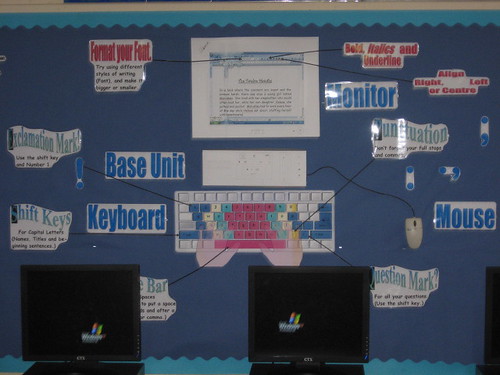
IMG_2379

Display in the ICT Suite @ Goodmayes Primary

In this issue we update those of you who missed Subject Leaders last week. Thanks to all of you who were able to come along, we had a record number of 42, which is very positive, but it does mean we need to think about a better location next time. Do you have any thoughts on that if so let me know.Could you also make sure that anyone who is coming to an event like this does register, it does allow us to plan for both refreshments an venue if we know exact numbers beforehand.

During the day we had three sessions on:

Updates on borough ICT

An Introduction to the London MLE

Moving Beyond Engagement with ICT and Literacy- here we used the required reading from last week, available here.

We were able to video the Updates session and the slides are embedded below. They are presented as a top ten, though they follow no particular order and are all important. I have summarised each of the points below, but if you do have any queries, then please email any of us and we will get back to you.


10 - We are now using Facebook as yet another quick and 'always on' tool for delivering news, links, pictures and updates. This is due to the recent changes in Facebook, which make it easier for an organisation to be a presence online. - Join us by becoming a fan

9 - Film Competition - There is still time to enter and for those of you who are confused the prizes are awarded for best in category and a prize for the best film overall.

Remember the four themes are:

Making a Difference Look through my Eyes


A brave new World Inspiration

Each film needs to be up to four minutes long and we will award prizes to teams of four children. There can only be one entry per Key Stage and we will only award a prize to the four pupils that created the film. The best film overall will not only mean a trip to the BBC for each pupil, but also a Flip Mino camera for every participant.

The number of schools that have currently registered to take part in the competition is 23. Visit the website for more details.

8 Visualisers and Mac Books for sale. We have around 10 mini visualisers and a trolley of 16 Macs for sale. The price for each unit is £400. Email Gary if you are interested. We are also keen that a school takes on the set of Asus devices that have been in Fairlop and we'd be really pleased if a school used these as part of a one laptop per child scheme. Email Alex or Anthony if interested.

We are not purchasing equipment for Innovation projects this year rather we are inviting schools to bid for up to £1500 to run their own innovation project. The project will need to demonstrate sharable and innovative pedagogy with technology and should demonstrate impact. We have a bid form within the resources area of Fronter for the Subject Leaders event on the 12th of March or click here. Please note any school wishing to take part in the project needs to be at least the commitment stage of the Self Review Framework - see below


7 Next Generation Learning - we are encouraging all schools to sign up to the Self Review Framework. This is an excellent tool for evaluating all areas of ICT within your school. There are eight elements to examine, including CPD, Teaching and Learning, Resources, Assessment etc. It is worth noting that parents are being made aware of Next Generation Learning through media campaigns on Radio and in both Tabloids and broadsheets. On the Next Generation Learning site, a parent can debunk terms like Interactive Whiteboard and MLE, while there is also the opportunity to search for ICT Marked schools within their local area.

Visit the Next Generation Learning Website

Begin the Self Review Framework

See a Youtube video on the launch of Next Generation Learning

6 Durrants Den

Another chance to bid for Money for a project. You will need to convince the CEO of the London Grid for learning and other formidable figures that their money will be well spent. See http://cms.lgfl.net/web/lgfl/projects/durrantsden for more details.

5. Support - we have been very happy with the support we pay for from Mina Patel from the LGFL. She has worked with schools on Video Conferencing projects, curriculum projects and VLE /MLE support. She has worked very hard on these areas across the school year and we have now run out of her allocated sessions for 2008/9. She will be available again from September 2009.

We are keen to make sure that we make the best possible use of her limited time and that as many schools as possible are able to benefit from her support. Therefore we are asking that all schools that require support from Mina, do not make their own arrangements with her, but rather request the support from us in the first instance. We'd ask you to email your requests to Tina.Pennells@redbridge.gov.uk for Autumn Term 09 in order for us to begin to put together a work plan. We appreciate your cooperation with this and look forward to Mina supporting all our work throughout the coming year.

If you require primary AST support from Nicholas Hughes, then please email Sue.Gyde for a request form.

Video of the updates session - please note its a bit shaky at first and as ever it is probably better viewed on a faster connection

4 Teachmeet North East London happens on the 31st of March @ 6pm. This is an evening of free CPD from Primary and secondary practitioners from all over the UK. You'd be silly to miss it.
Visit the site to learn more, do sign up quickly as space is limited, if you have any problems signing up, then email me and I'll do it for you.

3 Staff Mail - Next August the LGFL email accounts hosted by Digital Brain will be discontinued. In their place will be something called Staff Mail, part of a bigger initiative called London Mail, which also includes pupil 'Safe Mail' accounts. We are encouraging all schools to use Staff Mail, which looks very much like Outlook as their main means of email communication for school use. This is a safe and free system and aevans.317@lgflmail.org looks much more professional than crazydog73@hotmail.com . Schools are already beginning to migrate onto this service by completing a spreadsheet of staff members and emailing this to Gary.

2 Up and coming ICT Courses -

Using the Whiteboard Effectively- Numeracy 23rd April 2009 - please note this will use SMART and Activ Primary and is hosted by Liz Gibbs, one of the founder members of the National Whiteboard Network, who also co-wrote 'Keys to Learning'. Liz also works for BEAM education. Strictly speaking this is not a beginners course.

Reading and creating a film in a primary school 22nd April 2009 -hosted by Literacy ASTs, Nicholas and Anthony. Please bring your Flip Camera!!


1 The final Update was to say that all resources for ICT Courses and Subject Leaders meeting will now be housed within our growing MLE/ Fronter Room. www.fronter.com/redbridge

Each school that attended last week was given a card with their user name and password to help them login, pleas not these are identical, and any school with login difficulties should email me. The login is for the school to use and we will not be issuing individual accounts for staff or pupils, unless of course your school chooses to buy into Fronter.

Finally a reminder to all schools that we are currently planning courses and support and therefore really need your views. Thank you to the following schools, who have taken our survey.

Oakdale Junior School, Wells, Woodlands Junior School, John Bramston, South Park Primary School, Grove Primary School, Fairlop Primary, St Bede's, Nightingale Primary, Barley Lane,
Mossford Green Primary School, Aldersbrook Primary, Churchfields Junior, Snaresbrook Primary School, Churchfields Infants, Woodlands Infant School ,Redbridge Primary School
Cleveland jnr,Newbury Park Primary School, Ilford Jewish Primary and Farnham Green Primary


I really need the rest of you to fill in the form below with feedback on our service. Thank you

CPD Survey

It's that time again, when Maths, Literacy and ICT teams put together their support and CPD plans. in order to do this we need honest feedback from all our schools. Please take two minutes to fill in the form below. Headteachers, ICT coordinators or anyone involved in Primary ICT in school can complete the survey.