Monday, 15 December 2008

Assembly pictures

Charlie Bear

>

Many of you have requestedf info on the thorny issue of pictures of children @ Christmas productions. Last week the ICO - Information Commioner's Office, published the following press release, which emphasised common sense.

Any further queries email me or phone their help line: 01625 545745


Press Release
For immediate release
8 December 2008

ICO says festive photos are fine

This Christmas the Information Commissioner's Office (ICO) is encouraging a common sense approach to photographs taken by family and friends at school concerts and plays and is reminding parents that the Data Protection Act does not prevent them from capturing those priceless moments.

David Smith, Deputy Commissioner at the ICO, says: "All too often we hear of cases where parents have been prevented by schools from taking pictures of their children and friends because of data protection. We recognise that parents want to capture significant moments on camera and would advise a common sense approach. Photographs taken for the family photo album are exempt from the Act. Citing the Data Protection Act in order to prevent parents taking photos is a data protection duck out and can undermine the important role the Act plays in the protection of our personal information."

The ICO has produced guidance to dispel any confusion and explain parents’ rights under the Act. The guidance also provides advice for local education authorities and those working within schools, explaining that the Data Protection Act is unlikely to apply in most situations where photographs are taken by parents in schools.

The Act does apply when photographs of children are taken for official use by a school or college such as for issuing identification passes. In the other small number of instances where the Data Protection Act does apply, if the photographer obtains permission from the parent or individual to take a photograph, then this will usually be enough to ensure compliance.
The full copy of the guidance can be viewed here http://www.ico.gov.uk/upload/documents/library/data_protection/practical_application/taking_photos_v3.0_final.pdf
ENDS
If you need more information, please visit the website at: http://www.ico.gov.uk/
Notes to Readers
1. The Information Commissioner promotes public access to official information and protects personal information. The ICO is an independent body with specific responsibilities set out in the Data Protection Act 1998, the Freedom of Information Act 2000 and other legislation.
2. For more information about the Information Commissioner’s Office, subscribe to our e-newsletter at www.ico.gov.uk
3. Anyone who processes personal information must comply with the eight principles which make
sure that personal information is:
• Fairly and lawfully processed
• Processed for limited purposes
• Adequate, relevant and not excessive
• Accurate and up to date
• Not kept for longer than is necessary
• Processed in line with your rights
• Secure
• Not transferred to other countries without adequate protection

Sunday, 7 December 2008

Animation,Christmas,Tech Support Guidance, Bad Powerpoint


Welcome to another update from Redbridge Primary ICT. I hope your classrooms look as festive as our office!.

(see poor quality cameraphone image below- can you spot the festive Dalek?)

I know many of you will be using ICT to in your Christmas lessons, there are great opportunities here in everything from making cards to wrapping paper designs to animations of the nativity and spreadsheets for Christmas Gifts. If you do any of this, then please share with me and I'll post it on this blog.


In this Issue:


Woodland Infants Year 2 Animations


Christmas Resources


Guidance on Technical Support Document


Bad Powerpoint - a message for all those Inset Session Leaders


Last minute links

________________________________________________________________
Woodlands Infants - Year 2 Animations


A Year 2 class in Woodlands Infants recently created short animations in groups of two - three, based on the story, 'Thad gets to the Moon'. I was pleased with the outcomes and the children greatly enjoyed working on the project, which lasted two mornings.


The key to the success of this work was the dedication and hard work of the teacher, Mrs Yee, who was very prepared and had prepped the children well too! :

  • Each group had created 4 background for each part of the story


  • Each group was provided with an A4 size photocopy box, with a cut away front


  • Children all brought in a selection of action figures, which would be used to play the part of Thad or the Aliens


  • Children created the backgrounds and the Space Rocket in their art lessons


During Morning 1, children spent some time getting to know the how to use Digi- Blue software and camera. They created their own mini films of action figures walking about in space or encountering aliens.


By Morning 2, the class were familiar enough with animation techniques, to be able to begin creating the films. Here the class:


  • Were restricted to around 75 frames per scene- this equates to approximately 5 seconds per scene and meant each group created a film that lasted around 30 seconds


  • Worked together and many children developed and honed their skills of collaboration and supporting of each other. Some children acted as mentors to other children if they had finished early and this means that everyone got finished by Lunchtime.
What was needed:


On this occasion children used laptops and worked in groups of upto 3, one child operated the computer while another was a director, leaving the crucial job of altering the position of the props to the other group member. It is worth noting that the use of commercial action figures rather than plasticene considerably cut down on disruption to the animating process. Each group used a Digi-Blue Version 2.

Want to learn more?
Last year Nicholas and I put together a wiki site as an electronic handout for our animation course - see it here


You could also take a look at this help sheet for Digital Blue work from Sheffield CLC here


___________________________________________________________________

Christmas Resources

As you know, all good things come from Wales, and these resources for your Whiteboard are no exception. The NGFL, which is the Welsh equivalent of the London Grid has a large store house of resources for all Primary subjects, many of which work well on the Whiteboard to introduce or consolidate work/topics.

They describe their Christmas resources as:


Interactive activities for whiteboard or computer on the Nativity story and how Christians celebrate Christmas today. Activities are differentiated at various levels. They include an electronic version of the Nativity story, discussion topics on the meaning of Christmas, matching and sequencing activities, multiple choice question games, creating nativity pictures, matching pairs games and jigsaws.


Find these resources via the NGFL (English Version) or click here


IBoard also provide a number of Christmas activities and can be found in the content grid of LGFL, however these resources are also free to everyone thanks to Steve's generosity -click here for a link to their free free forever activities. These include templates for letters to Santa, a Christmas card designer,

SMART Board Advent Calendar
I love this SMART Board resource from Oxfordshire LA, click on the image below to download. It gives a new Christmas fact each day . There is of course the Doctor Who Advent calendar too, but that is not so educational, though your class will love it!


If you are an Activ Primary School, then of course you can customise your board and create a myriad of IWB resources using the themes and resource packs. These are free and can be downloaded from Promethean Planet. The picture below shows the Winter Holidays pack, this covers Diwali, Christmas and others too.


__________________________________________________________________


Guidance on Technical Support


In response to some queries and requests from Headteachers, we have complied the attached document. It is based on the model of having an oust side provider for network support, who take care of most of the big server stuff, while the in-house technician looks after the day to day running of systems. This is a model that works in most of our schools, though the technician's job descriptions from BECTA, could do with some fleshing out. This is what Alex, Gary, Nicholas and myself have attempted to do in these notes. Please note these are entirely voluntary and may not suit your school situation, though equally you may find they help you move towards a more proactive way of working.

Here is the PDF version - if you require the original Word Version, do email me. As you can see, I have also used Scribd to embed the document below. If you are a blogging school, then this is surely a tool worth looking at, as it allows the embedding of documents, it may even work with Fronter?!


As usual thoughts in the comment box or emailed to me at the usual address

Technicians Suggested Regular Tasks


___________________________________________________________________


Last Minute Links


The Rose Review - here is a link to the interim report - more on this later on my own blog - at present the highlighter pens are out while I look at it in more detail, but for now lets all be pleased that ICT is mentioned very strongly. You may want to read the chair of NAACE, Gareth Davies's response on his blog, 'Never Mind the Technology,Wheres the Learning?'

Simple Science

This site has a number of excellent video clips of Science Songs that literally sing the content of the Key Stage 2 QCA Units. These make great revision aids and could be embedded within blogs and (possibly) your MLE.

Enjoy this song about Unit 3A -Teeth


3A Teeth Song from Simple Science on Vimeo.


___________________________________________________________________


Bad Powerpoint
Last week I took part in a number of online discussions around the bad use of Powerpoint. I enclose two resources to get you thinking on this and some further reading.
The first is a quite famous video that illustrates, in a quite humorous way, just what are the features of Powerpoint missuse Look like, once you have seen that, then scroll down to the online presentation, which should give you some pointers for improving your presentation formatting skills.
Thanks to my fellow educational blogger for their thoughts and links


Death by PowerPoint
View SlideShare presentation or Upload your own. (tags: tips powerpoint)

Tuesday, 18 November 2008

What schools need? How they do it in Havering, Safer Internet Day, Edcity

Hello and welcome to another week of ICT Updates for Primary from Anthony Evans and Nicholas Hughes.


And to begin with here's a thought provoking video from Robin Hood School and NCSL, enjoy...


This text will be replaced


In this weeks issue:


  • Anthony and Nicholas go to Havering Subject Leaders Meeting

  • Education City - Where now?

  • Safer Internet Day

  • What every school needs?
This week we attended the Havering ICT Subject Leaders Meeting.

We came away with a few gems to share with our Redbridge Subject Leaders. It was also interesting to compare and contrast the provision for subject leaders in each of our authorities.

Here are some thoughts and observations.


  • Fronter - over 22 Havering primaries have taken the London MLE, this is almost 50% of the borough. Some exciting practice is already emerging.

  • The Havering Blogging Network - schools are encouraged to use edublogs for blogging and we where told of one school where a group of children acted as a news team for the school blog. This is a good way to facilitate blogging from children. It also take the pressure of teachers.

  • Like Redbridge Havering promotes the use of Video Conferencing and during the meet we linked up with the National Archives and also the rest of the ICT subject leaders at another school.

  • Interestingly this session was a 90 minute twilight session, unlike Redbridge which is a day, with free lunch and supply cover paid. (Now you know how lucky you are!)

  • We looked again at a range of mini-laptops including the Fizzbook and the RM Asus Minibook (windows version) A reminder from Nic - Remember if you want to network your mini-laptops they must have Windows XP Pro installed NOT XP Home. Most new mini-laptops come with XP Home. Remember to ask at Bett.

  • We also saw the Veho USB Microscope - Click the link for a review.

    It's is a nifty little microscope as the name suggests. It seemed to have really go picture quality. I have one on order and a fuller review will follow soon.

However Nic's arrived yesterday and it seems great. It is very intuitive and easy to use.


What every school needs? - By Nic

In my work I am lucky enough to visit many schools and talk to many ICT Subject Leaders.

On a recent visit to a school with new subject leaders, we got into a discussion about what is essential for ICT to be successful and embedded throughout the school.

These are the 5 things that we felt needed to be in place.


  1. Hardware – need to be working and well supported – The ideal is a on site person and external support.

  2. There needs a range of good software in school to support discrete and cross curricular ICT

  3. Teachers need have confidence through....
    - Having a positive attitude.
    - Training and INSET based on identified needs based on audits.

  4. The Network/Server needs to be clearly organised.

  5. There needs to be good levels of communication.


What do you think?


Do you agree is there something that has been omitted?


Safer Internet Day - 10th February 2009


To mark European Safer Internet Day, your school can download a pack of resources including new KS2 and 3 assemblies. CEOP will be creating and signposting you to all the resources you need for SID 2009. We would also like to hear your plans for the week.Get it in your school diary NOW! February 2009.

This is the perfect opportunity to introduce Internet safety to students or to consolidate the teaching you have already implemented.


CEOP's Thinkuknow programme will be producing a pack of resources available for download.
Click here to register and CEOP will keep you up-to-date with developments. You will be able to download the resource pack early February 2009.

Education City - Where now?


School leaders and ICT Subject Leaders, should now have had the detail about our Education City offer. If for some reason You have not seen this letter from Alex Rees, then read on:

Education City licensing arrangement
The London Borough of Redbridge currently holds a licence for all primary schools to have access to the Education City online content. The licence is due to expire at the end of November 2008 and the borough cannot fund a renewal of this licence.
We are aware that several schools make extensive use of this product and are confident that it is making a significant difference to the educational experiences they are providing for their students. Education City content covers Literacy, Maths, Science and French and has material designed specifically for Foundation, Key Stage 1 and Key Stage 2 students. At the normal listed prices subscription for Education City is £860 for 1 year or £1634 for 2 years.

Further information about the product is available at http://www.educationcity.com/.

We have been in negotiation with Education City to ensure we support our schools currently using this product, and enabling other schools not yet using the product to explore its potential. Education City have agreed that if Redbridge schools purchase together then you will be offered a discount price of £817 for a 2-year licence extension. This extension will only be applied to schools who opt in to this arrangement. This reduced price will be available up until the end of November.

If you wish to find out more about this product then three Redbridge schools have already agreed with Education City to be ‘Champion Schools’. You may wish to contact them to discuss whether the product may be useful for you. They are:


  • Churchfields Infants School


  • Clore Tikva Primary School


  • Gearies Infants School


Should you wish to take part in this offer then please contact Gary Jelks , immediately with a purchase order number for the licence. If you are using email please include the code ‘EC-renew’ in the subject line. This information must be with Gary by the 1st December 2008. He will ensure that your licence is then extended until the end of November 2010.


It is not the London Borough of Redbridge’s policy to promote individual ICT products. However an educational demand has clearly been demonstrated for this product and the Borough has therefore negotiated an arrangement to the benefit of the schools.
Yours sincerely,
Alex Rees


Last minute links

http://www.computeractive.co.uk/computeractive/video/2230140/zoostorm-fizzbook-video-review - A video review of the Fizzbook

http://www.jurassicpunk.com/ - a site containing lots of videos and movie trailer. Idea for film work within the Renewed Literacy Framework.


http://www.slamnet.org.uk/smart/defaultmaths.htm - a selection of help sheets for Smart Notebook 9.

Saturday, 8 November 2008

ICT Update - IWB Science, Display Pictures, Childnet CDS for Parents

Wrapping Paper made with 2Paint a Picture

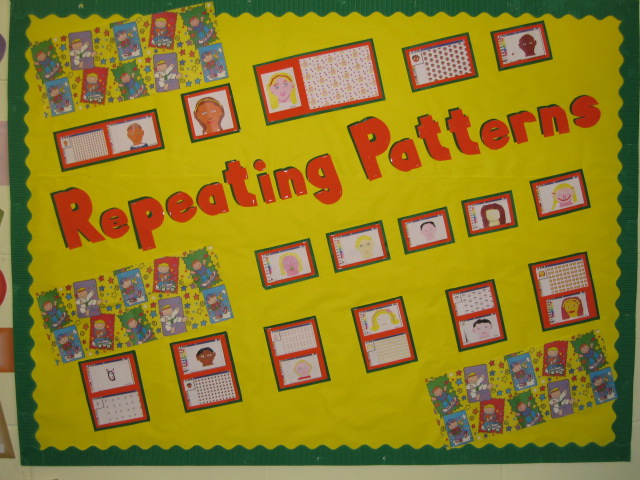
Repeating Patterns Work from Y3/4 @ Fullwood Primary- Well Done Class 6


Welcome to this weeks ICT update.

This began as a shorter than usual update, but once again I have found the world of ICT is rarely dull and never stands still and so here is another bumper pack of news,links and resources.

In this issue:


  • Science and the Whiteboard

  • CD ROMS for Parents - get them while you can!

  • Next Generation Learning

  • Christmas Activities

  • ICT Week @ Churchfields Infants

  • Anything to Share


Science Clips for the Whiteboard


Teachers TV, have recently added Science Clips to their stock of video shorts that already exist for both Literacy and Numeracy. These short clips provide a hook/ way in for lesson on themes such as 'Solids,Liquids and Gases', Sound and Habitats. The clips can be streamed directly from Teachers TV or downloaded, provided you have a Teachers TV account!


And..


If your school blogs, or uses a web authoring package like Dreamweaver, you might also consider encouraging teachers to embed Bytesize resources from the BBC into their pages. This is very easily done, and I know that Christchurch Primary did this in Year Six last year as a way of assissting children in their revision. All that is needed is to copy the embed code underneath the activity and paste it into the website or blog, when in 'Edit html' view


CD Roms for parents - get them while you can


During some of my recent ESafety events for schools, I have given out copies of the very informative 'Know it All for Parents' from Childnet. This resource explains in plain english how parents can help their children to use the internet and stay safe online, and includes technical tips like how to check internet history. 'Know it All' has recently been updated and is available free for schools, if they require.....sorry I can not bulk order for everyone, I did try.

In a recent post on Safetynet, Stephen Carrick Davies had this to say:

I am delighted to announce that with the support from BECTA and the DCSFa further half a million copies of 'KNOW IT ALL FOR PARENTS' CD Roms have been duplicated and are ready for schools to order free of charge from today.

See news announcement at http://www.childnet.com/news/articles/091008.html The new version includes updated sections on Cyberbullying, SocialNetworking and a short overview on 'Where to Report'. As with the earlier version, all the content is presented in video format with links to wider resources and pdf leaflets which parents and teachers can download from the disc.

We have also added Welsh to the translations of the overview section (now in 10 languages) The SMART content aimed atprimary school aged children is also now in British Sign Language. All this content has also been updated on the Childnet.com website see http://www.childnet.com/kia/parents/cd/


If you have any questions about ordering please email the Childnet team at info at childnet.com

Next Generation Learning


Officially launched last week is BECTAs Next Geneartion Learning campaign and its associated website. It is fantastic looking site, which will give simple explanations of school technologies, while pointing out the benefits of using and embedding this stuff in your school. It could prove a great resource for parents, heads and ICT coordinators.

My favourite area is the benefits section ,here we are reminded that:

  • Schools that use technology well across the curriculum and wider school life have reduced absence rates and achieve a higher percentage of A*-C grades at GCSE.

  • Pupils studying Key Stage 2 Maths, Science and English in schools which make the best use of ICT, improve at twice the rate of the national average.

  • When young people use technology to support their learning at home they do better in national tests.


I am slightly ambivalent about the front page -'Take the Test' area- here teachers or parents can input their postcode, or their schools postcode and find out whether their 'child’s school is geared up for Next Generation Learning?'. This allows you to find out whether your school has achieved ICT Mark status. I inputted my postcode and found that my local school was not 'geared up for Next Geneartion Learning'. I got thie message:


Unfortunately, there are no schools within the post code area IG3 that have achieved the ICT mark accreditation


Christmas Activities


Iboard resources for Christmas can be accessed via the LGFL content grid, but for speed and for those outside London, click on the link below


ICT Week @ Churchfields Infants

Before Half Term Churchfields Infants held a very successful and creative ICT week. I was lucky enought to be in the school after the event and nab a few pictures and discuss with the teachers what had gone on.


Pictured above are just some of the resources that the school uses to teach ICT in Foundation and above, proving once again that ICT is not just about computers.


Beebot jacket - pupils in Nursery made jackets for their Beebots. This is a great activity and far cheaper than buying the customised Beebot skins from TTs. If you want to make your own, or rather make them with the children, then see the templates on the Kent resource page on Beebots, here


Children also worked in groups to create their own adventure mats for the little yellow fellow to negotiate.


Finally the images below where taken in the school hall, where you can clearly see the progression in ICT from Reception to Year 2.


Anything to Share

It is great to post national updates on this page, but I am sure the most inspiring element of this blog is seeing work from local schools and hearing about what is going on across the borough. It needn't be wow and wizzy, it could be just ordinary ICT objectives - but done well. Whatever it is email me an image or 7 alongside a brief paragraph. Following a small edit from me, we will then post your school ICT experience here in order that others can share and be inspired.

Monday, 27 October 2008

Follow Up - How to remove the Navbar in Blogger

Many of you asked about how we remove the 'next blog' button in Blogger, or is it sometimes called the NAV bar. Here is a short video explaining how this is done.


Thursday, 16 October 2008

Redbridge @ HHL and Perspectives on Subject Leaders Meetings

Welcome to another Redbridge Primary ICT Update


ICT work from Year 1 in Churchfields Infants.

In this issue:


  • Subject Leaders Meeting (in case you weren't there)

  • Redbridge @ the Handheld learning Conference

  • Diwali Resources

  • Home Access for all launches and Next Generation from Becta

Welcome to this ICT update, I do hope you all have a very restful half term and that you spend at least some time online in Club Penguin or losing pounds on your Wii Fit.

It was great to see many of you at Subject Leaders last week, I counted 34 in the room at one point, there was hardly room to move! But it was certainly a fantastic atmosphere and the feedback was very good.


october08 009

We used Google forms to collect our evaluations and then fed the feedback comments from the evaluation form into a free tool called Wordle.net, this analyses the text and enlarges the words which are used most frequently.


This representation of text would be a great way into a story or poem. Try it and let me know what you did with it. Find it at Wordle.net.

More on Wordle in a future edition.

If you scroll down, then you can find a summary of the day, written by Sandra Lee from Mayespark.

________________________________________________________________

DIWALI Resources

IBoard resources that are hosted free on the LGFL have some lovely animated retelling and story creation tools for Diwali. These are great for Foundation and Key Stage 1, they are also a good alternative to a paper copy of the story which may be tired and difficult to see. Click here and choose the Green activities. Further and more detailed resources are available for a trial period here:


http://www.iboard.co.uk/thismonthfree/

________________________________________________________


Redbridge at the Handheld Learning Conference

Last week two Redbridge Teachers presented at the international Handheld Learning conference at the Barbican. Nicholas shared with us his work on Robosapiens, this was part of a wider collection of schools who were all showcasing excellence in ICT. Robosapiens count as an example of excellence then!
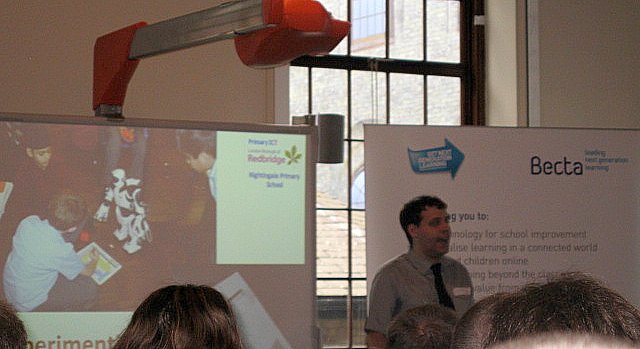

Nicholas presents on his Robo Project

In another session Dawn Halybone from Oakdale Junior talked to the assembled crowd about how she used Nintendo devices across the school. This was a great session, which received a lot of interest. I have embedded Dawn's presentation below, anyone wanting to develop work using gaming and consoles should follow the work of Derek Robertson on his Consolarium blog, part of Learning and Teaching Scotland, the Scottish equivalent of our BECTA.
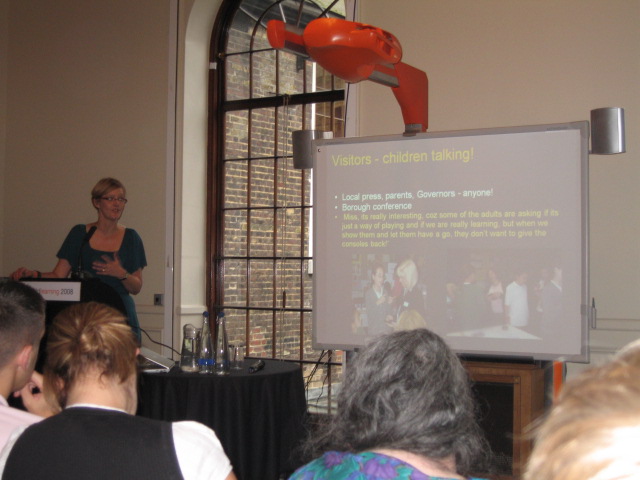
More Dawn @ HHL


Dawn Hallybone


View SlideShare presentation or Upload your own. (tags: handheld learning)


_________________________________________________

Government launches the first Pilot on Access for All

This week we learned of the two authorities which will be piloting the government's new programme which is aimed at bridging the 'digital divide'. Two pilots start next February in Suffolk and Oldham, a rural context and an urban environment. Becta are key players in the delivery of this programme, and it was good to hear their director, Andrew Pinder, speaking on the matter last week at the Barbican. Pinder is passionate about ensuring that all children have affordable screen access and the ability to get online.

The pilot programme was reported on this weeks BBC news website. where it was reported that Jim Knight said, that the scheme was not just about providing computers for those who could not afford them, it was also about selling the wider educational benefits of IT and the internet to those who were not convinced.

He said: "There has to be a culture where families see home access is as important as making sure their children have pen, paper and calculator at school.
"The bottom line is that having home access to the internet or a computer is no longer an optional extra for school work – it is fast becoming essential.
"Schools are revolutionising how they educate faster than many families realise.


This programme also coincides with BECTAs drive on the use of effective use of technology, 'Next Generation Learning'. Their new website reminds us of the huge sums that have been invested in technology, but despite this BECTA urges that we must do a lot more. We need to make sure that everyone understands the positive impact that technology can have in education, how it can help all learners fulfil their potential and build a better future for the nation

An explanation of Next Geneartion Learning is given in the Video Below. Look out for the very unusual technology that appears to be advocated in this filem, I am sure it will be within all our classes within the next 5 - 10 years.


Subject Leaders Event on the 16th Of November

Sandra Lee from Mayespark has blogged her observations and comments below:

Weekly subject leader’s blog

This is updated weekly and covers a range of news and upcoming software/ resources etc. This is read by a range of ICT subjects Co-ordinators and many found it very useful way of keeping up to date with current news and innovations. Some head teachers were even reading regularly!
Last week included updates from BECTA including widening access to Internet and Online learning as well as closing the poverty gap.

ICT consultant’s blog and AST blog also available- updates not quite as frequent.

Handheld Learning Conference

Handheld learning conference took place last week at the Barbican. There was a great buzz and interest around a range of handheld leaning. There were presentations from a range of major products and companies.
We were very proud that 2 delegates from Redbridge presented at the conference. Nic Hughes presented his work on the use of RoboSapien and Dawn Hallybone presented her work on the use of Nintendo DS in class.

Picture of ICT across Redbridge.

Anthony gave an overview of current ICT provision across the UK. He showed us information from the recent BESA report which showed statistical analysis of ICT resources and provisions.
Most Schools are now more equipped with IWB. There is a national trend towards more and more laptops in class. More and more schools becoming Wi-Fi enabled.

We then used Google docs to create a survey of ICT provision for the 30 schools represented within the room. The spreadsheet is a very powerful way of creating surveys. They can be used to complete a range of tasks such as staff skills audits, discovering information from your pupils etc. The link to the survey can be saved as a shortcut in shared space/drive or embedded as a link in a blog or web page.

Note the graphs below answer the following questions, based on the representation of just under 30 schools.

1. Is your school completing the BECTA SRF?
2. Is your school innovating with any exciting ICT devices?
3. Which of the following provide the best IT support services
4. Do you have an on site technical support person?
5. How much ICT Inset are you providing this year?


Messages

E-safety Sessions
Penny Patterson- ICT advisor in Havering is highly recommended- will run E-safety meetings for parents however does charge a fee. Anthony may be available to provide these. Children are spending more and more time on immersive environments such as gaming and club penguin. Are teachers aware of how their children are using the Internet?

SRF news

Fairlop has just achieved the ICT mark. This was hard work but felt worthwhile in the end. If there is already good practise going on and staff are engaged in this, then preparation does not need to be stressful. Assessors have been approachable and supportive so far. Evidence needs to be available to support your application but most of this should just be day to day work. When teachers were confident in discussing ICT this came across well.

Facebook

Protecting yourself - do not upload pictures of children in your class to your profile. If you are found to have photos of children on your own personal computer then you could leave yourself open for prosecution in event of an allegation- whether true or not. Professional responsibility also includes not discussing school/ confidential issues on your status or in public areas.

LGFL

Mina Patel shared some new updates to the content grid. Any questions or queries she can be contacted through the curriculum

consultant link on Lgfl.

  • KS2 French will be available in the next few weeks. A complete scheme of work, flashcards, activities etc will all be available to download.
  • Weather stations- All boroughs will have weather stations and all data will be updated regularly to enable schools to compare weather data across boroughs.
  • E-library. Lgfl is currently linking together many London libraries. There are also online reference sources such as Britannica etc.
  • Artisan Cam –This allows you to look at plants and how they react to their environment.
  • British Pathe- History key 2 – Newsreels 1920-1970. The license has been extended till December and negotiations are underway to extend this license for another 3 years. These videos can be embedded into flipcharts, blogs etc
  • US Onlne – E safety. Children can complete a range of E-safety activities, upon completing each section there are rewards available. This is part of the ‘Celebrating US’ unit from KS2 citizenship.

New E-mail accounts for all staff LGFL Mail

There is a new e-mail roll out for staff based upon Outlook and can be configured to link with laptops, PDAs etc. An Atomwide (USO) account is needed to create accounts. Pupil versions of this are coming soon- if you want to access these sooner please contact Mina Patel. Gary jelks is currently creating accounts for all staff in schools and you will need to contact him for accounts for your staff. If any problems e-mail Gary.


E-mail in Lgfl will not exist following 2010. This is the new roll out and staff are recommended to begin looking at moving over to this new system.

Black History Month on the LGFL

Lesson plans are in the process of being completed and hope to be available from November onwards. These are based on the video conferencing activities that happened across Redbridge on Oct 1st including the Redbridge museum, DJ Spoony, Dr Funke Baffour and contributions from several schools -Uphall, Woodlands Junior and Aldersbrook. This was streamed live for schools across London and the country to see. There was a forum available to ask questions as well as schools which joined the live video conference.

http://www.blackhistory.lgfl.net/

Video conferencing equipment is available for loan to schools. Contact Gary Jelks.

School Websites


There needs to be a showcase first area but then a collection of blogs can be linked to this area to develop interaction and keep updates dynamic. Class blogs can be linked to your website as a means of providing up to date information to the wider world. You must ensure that it continues to look professional, but is a quick and easy way to keep your website fresh. All staff can access and update their own blog, sharing the workload of the updating the school website.
Clubs and activity groups can also have their own blogs. This allows parents to be more connected to their children’s activities at school.

Blogs can be just one photo and a paragraph per week- they can be as large or a small as the teacher wants to make them.

Setting up blogs

• Have one school account for all teacher blogs. This allows one person to maintain an overview of all blogs as well as maintain control if necessary.
• There is an excellent how-to guide on the Leading teachers how to-blog.
• One template can be used for all blogs to maintain a school image.
• Some schools copy and paste newsletters to parents straight into the blog.
• You can add links to pictures and movies by using gadgets. Be aware of the images that you choose and where they are saved.
• A list of blogs can be showed down the side using the gadget application. This can be used to navigate between school blogs.
• The use of comment boxes should be carefully considered. Comments settings should be set to ‘moderated’ in order to prevent inappropriate posts.
• Next blog button on a blog page should be removed as it can take you to any other blog at random. These may or may not be appropriate. Instructions for this are again available in the leading teacher’s How-to guide. Copy and Paste the HTML code from the How-to guide into your blog page to remove the header bar.


TAG Learning

Sherston, Black cat and several other companies now under the same umbrella.

Film Awards- Tag has created its first annual film award. Some LEAs have internal film awards and are now looking at sharing these with a wider audience. Redbridge are now holding their own film awards at the end of the year. To learn from their experience Matt gave us some pointers.

Floella Benjamin has chaired the judging for the awards. They looked for storyboards then looked for the stories unfold. They looked for a beginning, structure and end. They looked beyond the ICT skills and were more interested in the film making process as well as the end product.

Film provides the access for all children. Children can be motivated and engaged which allows for ease of classroom management. All children can take roles both in front and behind the camera.

Flip Cameras

Flip is a new camera available from Tag.
• Superior sound quality and ease of use are key features of this camera.
• Will store up to 60 minutes of films.
• 2 Gb hard drive. 2x digital zoom.
• One button to start and stop.
• Films can be saved in a high quality version and a lower quality version for e-mailing.
• Very simple editing software. But clips can be saved into Microsoft movie maker and edited easily then.
• Software carried on flip so no issues with software on networks.
www.Flip.com – information and reviews of the camera.

£ 84 each
5pack at £400
10 pack at £ 750.
Schools can get together to make collective orders to increase bargaining power- contact Matt for details.

DMC 3 £ 99 (New digital blue)
Stop animation, web cam and editing facilities are better in digi blue.


Fizzbook – Windows XP sub laptop.

For less than £250. Only available with XP home which present issues for networking these.
Dawn spoke about Handheld learning conference. Spoke about her experiences using a Nintendo DS. Schools are using only a few copies of software and hardware and still getting excellent results. Whole class equipment not always necessary.

• Wii Endless Ocean – Using games as contextual basis for writing and explorations.
• Nitendogz on the DS- can be used for whole units of work.
• Mind your language and other software is becoming more available.

The children will be engaging in these games for short periods of time and work then branches off from there. Some schools are using hand helds which the children bring in or using just one or two pieces of hardware which are provided by schools.

Website for these examples include LTS Scotland Home.


PhotoSynth

Recently blogged about by Anthony. Leading teachers created a photosynth which can be accessed from the photosynth website.

Photosynth is a piece of software that can be used to mesh together photographs to create an immersive environment. This can also be used as a stimulus for writing and for beginning many projects as well as exploring unknown environments. Shared visualisations are an excellent context for the beginning of a unit.

• Take lots of photographs that overlap.
• Stand in the 4 ‘corners’ of the environment that you are working in can take lots of photos around that point. Then stand in the mid point between these points

J2E

A multimedia word processing tool that can be used at home and at school was shared by Val at Gearies. Work was done at home by year 2 with a member of their family. Some children worked with older brothers and sisters as well as adults in their family. Pictures and other objects can be included.

www.j2e.lgfl.net

Allows on-line collaboration- very powerful tool which will be available soon.


Fronter

By 2010 all schools need to have a MLE (Managed Learning Environment). All schools currently have a VLE (Virtual LE). MLE will integrate information from SIMs as well as allow access to documents, files etc. Fronter has been chosen as the favoured MLE provider. If schools are interested they need to contact Alex Rees on Alex.Rees@redbridge.gov.uk

Some schools are beginning to use Fronter and the roll out is going to be step by step in Redbridge. Redbridge Primary ICT room is now available to ICT co’s. This will now be used as a central resources area for all documents, files, videos etc.

www.fronter.com/redbridge

Subject co’s contributed to the forum to share ideas and questions.


Film awards

Listening task

We shared the soundtrack of a film and created a word bank and time line. Using this task we created a sense of anticipation as well as an appreciation of how sound and music can be used to create atmosphere and contribute to a film.

Film is a powerful tool through which to teach and engage children. www.filmeductaion.org has many clips to engage and inspire children to create film. Films can be used as a stimuli as well as an end product. Film is mentioned as an outcome in several units across the new framework.

Redbridge will be holding their own film awards at the end of the year. The criteria for which is available …….

We then used a range of film clips to create our own live action film. Audio.lgfl.org.uk gave us a range of music to search and use for our film. (This is only available in school or the teachers centre).


Doctor Who trailer maker and High school musical trailer makers are also really useful.

Evaluation of todays Subject leaders Course

Monday, 13 October 2008

Subject Leaders Agenda

Warholed Leo

16th October 2008

ICT Subject Leaders Provisional Agenda

9:00 Welcome and Activity
9:15 Session 1 - LGFL News - Mina Patel 'from the LGFL'
9:35 Session 2- A school website - should look like this- Nicholas Hughes
10: 45 Tea and Coffee
11:00 A New Tool - the leading Teachers
11:20 - The Flip - Matt Williams - Tag Learning
12:00 - Lunch and Networking
12:55 Session 3 - TBA - Anthony Evans
2:05 Session 4 - The New Room - Anthony Evans