Wednesday, 17 September 2008

Updates from Anthony and Nicholas Week 3

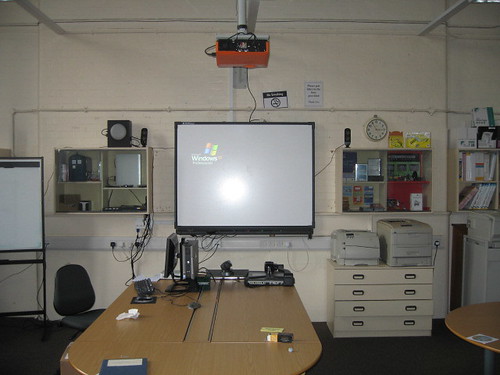
It has been another varied and busy week in Redbridge Primary ICT. The picture above shows the two new Asus Windows version, which RM came to show me this week.

(more details in a subsequent post, but for now let me just say they are very nice)

In this weeks issue:

  • Maths ICT and Ofsted

  • Self registering on an IWB


  • Clicker - as a communication tool


  • Free multimedia control software for upper KS2 - 'How tos' now live


  • New feature in You tube - Nicholas tells us how to avoid video nasties
Maths ICT and Ofsted

Today sees the publication of an Ofsted report on the state of Maths in our schools. There are some mentions of ICT and these are as follows:

  • In the survey schools, primary pupils had some opportunities to use ICT in mathematics but there was scope to develop this further. Typically, one or two pupils at a time used a couple of computers in a classroom to practise basic skills. Many schools had a separate computer suite, where lessons across a range of subjects enabled pupils to learn how to use ICT as a mathematical tool, for example using spreadsheets to generate number patterns or present statistical information, but using it to enhance learning in mathematics was more limited.

  • The interactive whiteboard featured in many (but not all) primary and secondary classrooms, bringing positives and negatives to teaching and learning. Good practice included the use of high-quality diagrams and relevant software to support learning through, for example, construction of graphs or visualisation of transformations. Pupils enjoyed quick-fire games on them. However, many of the curricular and guidance documents seen did not draw sufficient attention to the potential of interactive whiteboards. Additionally, too often teachers used them simply for PowerPoint presentations with no interaction by the pupils.

  • A negative effect of interactive whiteboards was a reduction in pupils’ use of practical equipment: software is no replacement for hands-on experience, for example in measuring angles and lengths. Teachers generally underused practical resources and games to develop pupils’ understanding of mathematical ideas and help them to make connections between different topics.

An example of the above is given later on in the report whereby a teacher is showing the class 3d shapes on screen. Even though the shapes can be rotated on-screen it is still essentially a 2d representation of 3d objects. It is therefore difficult for children to gain a full appreciation of the properties of these shapes as they have not handled them for themselves.

Self registering with the IWB

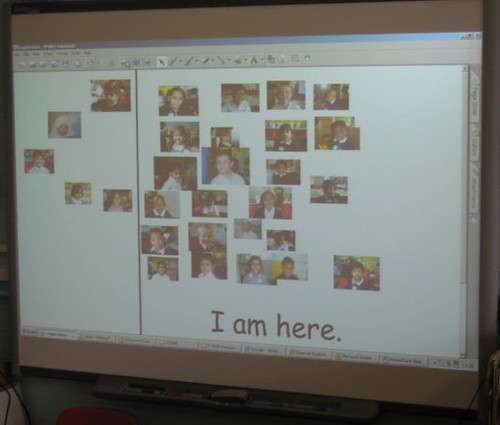
I have been working with some teachers in early years on using the SMART Board and their digitalis camera.One simple activity for the board is self registration. This is simply importing all of the class photos onto a notebook or flip chart page, and then allowing the children to drag and drop their picture from left to right. The activity can be improved further by cropping each picture and by grouping each image with the child's name.

Here is an example that one teacher created this week.

Self Registering


Teacher wishing to create a self registering tool for lunches can use an this free online tool found here, or on the image below


Clicker as communication Tool

I have long since been an avid fan of Clicker as a great tool for children of all abilities. It can allow children to build up sentences very easily through using words and phrases as building blocks, and as such it makes a great Word Processor in Key Stage 1. It can also free children from the dread of the blank white screen, as teachers can add Clicker grids as a scaffold and support to unsure writers. Furthermoe it can be used to create presentations and 'on-screen' books.

Last summer I worked with Dan (ICT) @ and Scott (SALT) @ Hatton school on another use of Clicker. Many children both in the school and within the Outreach service make use of 'All About Me' books. These allow the child who struggles to communicate a way to share information about themselves using a combination of PECS symbols and relevant digital images.

I knew that if we created an electronic version , then the book could contain a greater number of durable pages as unlike the paper version, they don't fall out! Furthermore this e version would allow the words to be spoken back and allow for smooth navigation as readers would be working on a PC a medium that many children are far more motivated by.

I have created a short film showing the difference between the two books below, though please note I still think there is huge value in the paper versions, it would just be good to see the paper copy in use alongside it's electronic counterpart.


Free Multimedia Control Software for Upper KS2

Many of you will remember SCRATCH, free control software which we showed you last year at Subject Leaders. Some teachers were eager to use this new and exciting programming tool, though they were unsure where to begin. Now a consultant from Bradford has put together some helpful lesson plans and tutorials to help teachers get going.


If you have not seen Scratch before, then here is an introductory video made by its creators, MIT:


The lesson plans and tutorials by Paul Scott, are available from the Bradford learning Platform.

New feature in You Tube

We all know the issues with the 'other' content on youtube, that we don't want out children to see. Embeding the video in a blog, like below, is one way round that. But at the end it still give you other related videos - depending on what you search for these might be unsuitable. Click play and skip to the end to see the suggested videos.


Now on the You Tube website itself - next to the embed code is a little gear icon - click on it and you will see what is below. Here you can change the colour of the video player, add a border if you want and most importantly remove the related video results.


Click below and now skip to the end - look no results. Very quick and usable tip. Enjoy.


Links just in

Teachers are piloting multi touch screens - this from the BBC news

Nintendo - Make 10 - could this be the new game that we all want to use with our class on the DS?

How to sheets for the Digi-Blue Camera- these from the Welsh Grid For learning

Tuesday, 16 September 2008

National Poetry Day Event

Another Video Conference event - you may have missed the details for:
This also comes to me from Mina Patel

Hello again everyone, you may have heard about this Video Conference from Brian too.

However once again I hope you are able to forward this message onto your Literacy/English advisors KS2 and KS3/4 and to schools who you know may wish to take part. The schools could take part in the poetry writing competition only if they wish, or just the Video Conference, or take part in both.

National Poetry Day - October 9th 2008 – London Event (and Competition!) by Videoconference hosted by Havering LA


LGfL partnering with Havering LA would like to invite you to take part in this National Competition. The theme for this year’s National Poetry Day is `Work`. So in order to celebrate this, we would like children to write poems about different jobs. We are delighted that authors Alan Peat and Gervase Phinn have been secured to judge the finalists. Deadline for handing in competition entries is September 30th.
Please visit this link to read about the prizes and rules:
http://www.lgfl.net/lgfl/sections/poetryday/homepage/poetry%20comp/?verb=view

We would also like to invite you to take part in a videoconference for primary and secondary schools during National Poetry Day, on October 9th 2008, starting at 8.50 am and ending at 3.15pm. Please visit www.poetryday.lgfl.net to see the programme for the day.

Schools do not need VC equipment to take part, just the school’s internet connection, to watch and participate in the online forum, so please register at: http://www.lgfl.net/lgfl/accounts/forms/web/forms/poetry_booking.htm

Thankyou

Mina

Black History Month Event Final Call

This just in from Mina Patel

Hi there everyone, guess you may have already heard about this VC event from Brian.

However, I just thought I`d send you all an email so you could possibly forward this to your EMA Team, or schools you personally know that may want to take part.

Final call for Black History Month Video Conference – Register before 26th September, 3pm.

The London Grid for Learning, working in partnership with Redbridge Ethnic Minority Advisory Team and ICT team, would like to invite schools to take part in a videoconference for KS2 during Black History Month - 'People of Achievement Past and Present' on October 1st starting at 8.50 am and ending at 12.10pm.

There is now a `new` updated programme – so please go to: https://owa.redbridge.gov.uk/exchweb/bin/redir.asp?URL=http://www.lgfl.net/lgfl/sections/blackhistory/homepage/programme%2520final/?verb=view

Schools can take part via video conference or via the live stream and using the live forum. Schools do not need VC equipment to take part. Just an internet connection needed.

We have celebrities and guest speakers……. DJ Spoony , Dr Funke Baffour and Sandra Agard presenting on the day.

Please register before the 26th September on: https://owa.redbridge.gov.uk/exchweb/bin/redir.asp?URL=http://www.lgfl.net/lgfl/accounts/forms/web/forms/BHM_booking.htm

Friday, 5 September 2008

Updates week 2


'Beebot Island'- a display in Fullwood Primary

I hope you have had a good first week back. The week immediately after summer is often fraught with technical difficulties and paper jams in the IT room as new peg labels, timetables and Literacy Plans churn out of the printer.

Thank you for the emails and news sharing this week. I have enjoyed seeing new ICT rooms in some schools, fresh displays in others and of course teachers who are keen to show their new class new software.

I went to Fairlop Primary this week to talk about the Asus machines and I am keen to see how they get on when Key Stage 2 take these with them to Glasbury. The children will be using these mini notebooks to create diary entries of their week, using Open Office software. They may even use the small but formidable web cams to shoot mini clip videos or stills for the Fairlop blogs. We look forward to the blog posts later this term.

-------------------------------------------------------------------------------------------------

In this issue:

Welcome to our New Adviser for ICT
Events
Institute of Education Primary ICT Conference
A Redbridge school at the National Handheld Learning Conference

Whiteboards
SMART Notebook -are you 10 yet?

Focus on :
Photosynth
Spelling City

Welcome to our New Adviser for ICT

Alex Rees joins the Redbridge school improvement service from a secondary teaching background taking up the post of School Improvement Adviser (ICT). Prior to teaching he enjoyed working in the IT projects team at the Barnardo's Head Office in Barkingside, but once qualified as a mathematics teacher he has held a variety of teaching and ICT management roles across Essex. These roles include being Director of Faculty at Greensward College; ICT Coordinator at a large KS1-KS5 independent school; and Director of eLearning in a secondary comprehensive school.

He has successfully lead project management teams on implementing VLE's, building new ICT-rich school facilities and embedding data management solutions. Alex has also acted as an independent consultant for a number of secondary schools and related organisations including the SSAT. Alex lives in Maldon on the Essex coast with his wife and their 8 month old baby and enjoys making music, playing football and sailing dinghies to relax.


Events

Thank you to Bob Drew for passing on the details of the

Institute of Educations ICT Conference:
Dream or Virtual Reality

A one day conference organised by the school of early Childhood and Primary Education, Insitute of Education and the London Knowledge Lab.


19th November
@ the Jeffery Hall
9:00 am- 4:00pm
The programme includes the following research informed talks:

  • 'Children's learning in the age of digital media' by Professor David Buckingham
  • 'Children's perspectives on 'out of school/in school' ICT 'by Dr Neil Selwyn
  • 'How Effective is Cool? - Learning through mobile technologies'- Professor Rosie Luckin

There are also 'Learning Conversations' led by Primary Practitioners focusing on innovative use of ICT, as well as Lunch, an exhibition and a Bookshop.

Further details from Sue Grant from the Institute or call 02076126588

There is also the Hand Held Learning Conference next Month from the 13th to 15th of October @ the Barbican, click here for further details, we are proud that our own Dawn Halybone form Oakdale will be representing, read on...


Nintendo DS Project to Feature @ International Conference

Dawn Halybone tells us about her participation at the Handeheld Learning Conference next month. She writes,

Very exciting news following the use of the consoles at Oakdale. During the Summer I was asked to submit a paper for consideration to speak at the International conference for Hand Held learning to be held at the Barbican from Oct 13-15th! The paper was accepted and I have been asked to speak during one of the break out sessions on the Tuesday. The session is entitled 'Game On' and is sponsored by Nintendo, it is being chaired by Chris Deering, former President of Sony Computer Entertainment and will focus on the questions:Do games consoles and off the shelf games titles have a role in learning?How game-based learning is challenging all the rules? The conference so far has 1000 delegates, 150 confirmed speakers and 50 exhibitors, so will be an amazing opportunity to showcase the work that we are doing in Redbridge!

SMART Notebook 10

Many of you who use a SMART Board will be switching to Notebook 10. This is the biggest update from SMART for a long time and includes some long sought after features and some old favourites made easier. For instance you can now finally include tables within a SMART Notebook, while the magic pen allows you to easily focus on, magnify and highlight an area of the screen. Expect to see demonstrations of these features over the next few weeks here on this blog, but in the meantime, here are some helpful tools we have found on the web to introduce your staff to what's new in 10:

Focus on

This week Nicholas and I have found two free apps which we think will make your whiteboard zing.

Spellingcity.com

This is an excellent resource for teaching the weekly spelling list, which children often slavishly copy into their books on Monday morning. Teachers can post spelling lists online, which the class can then locate on the spellingcity website. They can then play games and/ or do an electronic version of Look/Cover Write Check, all before they complete a test. The test is marked and the site identifies which of the spellings the student got wrong. For more on this, watch our mini clip below, and take a look your self @ http://www.spellingcity.com/

Photosynth

Photosynth is a new tool from Microsoft, which I think is the new Photostory 3, in that it is easy to use and has the 'wow' impact in the classroom. Though I must stress Photosynth is not a musical slideshow tool.

With photosynth you upload a batch of images you have snapped of an object, scene or object and then let Photosynth use it's new technology to analyse the photographs and look for reference points. It then matches these points and stitches the images together. The result is a panorama of an area, that can then be magnified in a style very similar to Google Earth.

The applications for classroom use of this tool are huge, this could mean a new way into story writing, where children and teacher explore an area such as the spooky woods in 3d, before describing the setting in their books. There could also be application of this tool in Geography or school journey, every child could take an image or images of the same are of the Zoo, London, Shopping area etc in order to create a class synth.

Watch the video below and visit Photosynth.com to begin making your own. Once you have done this, you will be able to view those made by Nicholas and myself, at the foot of this entry.


Tuesday, 26 August 2008

ICT Updates from Anthony and Nic


Welcome back, after what I hope has been a very good break, and if the Facebook status from some are anything to go by, then many of you have rested and relaxed very well indeed.


Image from Flickr- Felix-Le-Chat

In this Issue:

Courses and Events:

  • New TA Course
  • Black History Month
In the News:

  • Face Recognition Software

  • Youtube content questioned by MPS
Planning Support:
  • "Redbridgized" Newham Plans including SMART Notebooks now Ready!

Focus On:

  • Flip Video

  • Usonline Esafety Resource

New TA Course

Redbridge Primary ICT recognise the huge role that Teaching Assistants play in both enabling children to overcome barriers to learning, and the many tasks they carry out to relieve teachers admin burden. Proficiency in school specific ICT can greatly improve the efficiency and efficacy of a Teaching assistant and experience shows that these skills and confidence spread quickly.

With these considerations in mind, we have put together a course for Teaching Assistants on school based ICT, aimed at those who have moved just beyond beginners stage in using computers in school. The course will involve one day of each half term from 08/09 and participants will need to complete a school based gap task. We will also require TAS to complete an ongoing electronic portfolio of their work, leading to the award of a certificate. There is an expectation is that delegates attend all six sessions, a charge may be incurred if sessions are missed.

Details of this course has been emailed to all Primary Head Teachers this week and we have already had interest. Please speak to your Head Teachers/ CPD coordinators about the course, which is not available via redbridge PDC.

Black History month @ Redbridge

BHM Primary School Video Conference – October 1st 2008

The London Grid for Learning, working in partnership with Redbridge Ethnic Minority Advisory Team and the ICT team, would like to invite primary schools to take part in a video conference during Black History Month showcasing People of Achievement past and present – on October 1st from 8.50 am - 12.45pm.

To find out more about the recently updated programme go to www.blackhistory.lgfl.net
LGfL are streaming the morning event live via the Internet too and pupils will have the opportunity to ask questions via an online forum – so all schools can potentially take part! Register now at: www.events.lgfl.net

If you want to be involved - that is if you want to watch the live stream, then you have to register on www.events.lgfl.net- you will then be sent a URL. Please also note, you do not have to have Video Conference Equipment to take part as viewers of this event, just a projector and the URL from Mina Patel!

In the News

New Report on Youtube and Inappropriate Content

MPs are calling for sites that host videos and images, such as Youtube to improve the way they deal with inappropriate and harmful content. They do not accept that it is not possible to screen all of the videos that are posted and want the speed of 'taking down' of a violent or pornographic clip to be greatly increased. They also say there should be clearer guidelines for user on what is acceptable for them to publish.


Lets watch this space to see how the UK Council for Internet Safety responds.


You can read the report from the Culture Media and Sport Committee here


Though if you are in a hurry, then read the Telegraph article here

ICT in the world around us - have you seen?

Face recognition @ Airports - a good example of an ICT Control System, which 'monitors events and responds to them'- see Key Stage 2 ICT Curriculum


Direct Link to video here


Planning Support:

Newham Updates and adaptions


Over the summer we have worked very hard to adapt and change the Newham Scheme of Work into a Redbridge friendly format. Thanks to Gill Web at Chadwell Primary for her initial hard work on these conversions. Detailed below is a breakdown of the changes that have been made to the scheme. Should you wish to obtain the Smart Notebooks and adapted plans then please email tina.pennells@redbridge.gov.uk for a DVD. If you have any queries about the plans please email Anthony or Nic.


  • Conversions from Activ Primary to Smart Note Book - All units from year 1 to 6 now have a Smart Note Book File. Please note you will need Notebook 10 and an updated gallery including Lesson Activity Toolkit to use these files. To download Smart Notebook 10 click here.

  • All Creating Pictures units have been updated to use 2paint and picture and Artrage. Artrage is free and was recently demonstrated by Ian Connor and Subject Leaders. Click here to download.


  • All Giving Instruction units have been updated to use Focus on Beebot and FMSLogo (MSWLogo). FMSLogo (MSWLogo) is free, click here to download.


  • Handling Data in year 1-3 have been updated to use 2Simple programmes such as 2count, 2graph and 2investigate.
Considerations

  • Please note that we do not entirely endorse the Newham Scheme of Work or the software listed above. However we feel that many of the units are worth using as they present ICT in a meaningful context, and have clear progression. Furthermore for the busy coordinator there is ample support material, such as help sheets and videos.

  • Please remember there are the Internet units created by the Leading Teachers which have been tried and tested in schools as an additional resource.
Focus On
Flip Video Recorder


The Flip is one of a growing number of budget pocket sized video recorders. The name flip comes form the pop out USB plug in the base, which makes plugging in and retrieving the video a doddle. I had a play with one of these recently and was very impressed with quality of the video and ease of use.


What makes these ideal for Primary is their simplicity, it has been described by Web User as 'possibly the easiest Camcorder to use'. My own experience and anecdotes from friends who own this device would bear this out, comment like 'even my mum could use it' prove how intuitive this device can be to operate. On the back of the device is a large red record button, press it again to stop. Press play to view your work and bin to delete. Sound Familiar - yes this simplicity is a similar claim made about the Digi-Blue some some time ago, but with this device there is no awkward plug and play issues or device not found errors. Its similarity to an Ipod or mobile phone also gives it that Year 6 appeal and therefore gives progression and credibility to film work in upper Key Stage 2, as by this time using the same blue camera you used in nursery is slightly embarrassing!

Details:
Powered by two AA batteries
Cost: Around £84
Capacity: 2GB Memory meaning
Software- pre-installed simple editing software (though you could of course use Movie Maker)that allows output to the computer or Video Sharing Sites like Flickr,

Where do I buy this?
Tag Learning

Note
During Next Subject Leaders Meeting I have asked Tag Learning to bring along a number of these Devices to show us.

Other Cameras similar to the Flip do exist and are being released all the time, one such camera is the Creative Vado


Usonline

This is an excellent Esafety Resource by ROAR education, which is hosted on the London Grid for learning. Subject Leaders voted this the best ESafety Resource during the July meeting, this was based on ease of use and clarity of message. I recently taught some classes with these activities and it really made the children think about how they present themselves online. The only downside of this resource was that in order to use it, you need to log on with your LGFL user name and password. Also at times the computer suite I was working in struggled to cope with all 30 children using the website, we have not got to the bottom of why this is yet. A way round this might be to use this in groups or as a whole class whiteboard discussion activity.

Here are Nicholas and I talking about USonline


Visit http://www.usonline.lgfl.net/


or http://www.roareducate.co.uk/

Last Minute Links:


We tell Stories- a Penguin Books site, where six popular authors have created story interactive story frames that make use of Internet technology to create narratives. The Fairy Tale story looks like the most Primary Friendly. - Thanks Simon for this link!


My.Deco.com This site allows you to plan a room in 3d in the way that you do in the Graphical Modelling Unit for Year 5 - see Unit 5A to refresh your Summer weary memory. What I like about this site is that the furniture cost can be calculated and the site uses products from IKEA, John Lewis etc.


Friday, 8 August 2008

Changing Rooms

As always the summer is a time for tidying up, clearing out and getting things fresh and new for the the year ahead. We have chucked out a load of unimportant material from S4 this week and put up some fresh display, thanks to Highlands Primary for their ICT across the curriculum posters that now adorn the dsiplay screens.

The biggest transformation though, has been the whiteboard, many of you will know how frustrating it has been to work with the wobbly SMART board and its trolley over the last few years, well now at last we have lost a few cupboards but gained a new fixed position for our board and brought it up to date with Notebook 10.

I am looking forward to courses and meetings in the new improved S4.

And here is the new board


IMG_0805[1]

Board off the Wall 2

IMG_0802[1]

Friday, 18 July 2008

Visualisers Blog


Thanks to Andrew at William Torbet, who has been plotting the schools' use of Visualsisers over the last term on his blog.There are some good points and lessons learned.
more...

Tuesday, 15 July 2008

ICT at Oakdale

It has been a really exciting last term at Oakdale, as many of you know, we were lucky enough to be chosen to have the Ds consoles this term, which has been fantastic. However, coming along to Subject leaders for me this term has been another real and unexpected highlight, finding out what other schools are doing. As a result, we now have a blog, which is developing all the time, children came to the conference and had their own 'un' conference which resulted in the children knowing how to use the digi blues to animate and could therefore show and teach other children! As well as wanting to bring the Robots back to school!
But it has been the whole ICT experience and the sharing that I have enjoyed so much and has given ICT at Oakdale new ideas and inspirations, so I would like to thank one and all!! if you would like to read more about the Ds project and see a short snippet of the animation work, then please take a look at our blog at: www.oakdalejuniorschool.blogspot.com
Dawn Hallybone